> ## Documentation Index
> Fetch the complete documentation index at: https://docs.dodopayments.com/llms.txt
> Use this file to discover all available pages before exploring further.
# v1.106.0 (July 7, 2026)
> Localized Pricing with per-currency and per-country price rules, three new payment methods (Satispay, BLIK, and Klarna for subscriptions), feature flag entitlements, Apple Pay domain registration, and editable add-ons at checkout — plus subscription period extension and add-on image removal.
## New Features
### 1. **Localized Pricing**
You can now set **fixed prices per currency or per country** instead of letting exchange rates decide the amount a customer sees. Turn it on by setting a `pricing_mode` on a product, then attach one price rule per market:
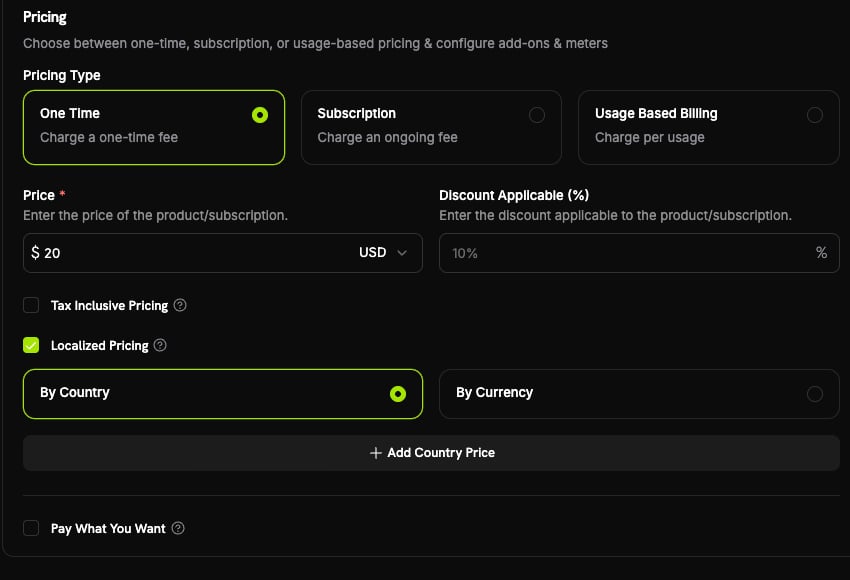 | Mode | What it does | Example |
| ------------- | --------------------------------------------------------------------------- | ---------------------------------------- |
| `by_currency` | One fixed price per currency, regardless of country | Everyone paying in EUR sees **€9.99** |
| `by_country` | A price specific to a country, even when several countries share a currency | **₹999 in India** on a \$20 base product |
Manage rules through the new `/products/{product_id}/localized-prices` endpoints (create, list, get, patch, archive). Each rule's `amount` is an integer in the currency's smallest unit — a price you set, never a converted value.
When no rule matches, the product keeps its existing behavior: customers in your base currency pay the base price directly, and everyone else is converted through Adaptive Currency. When a rule **does** match, the customer pays **exactly** the amount you set — the Adaptive Currency FX fee is absorbed rather than added on top.
This is the recommended, native way to run **Purchasing Power Parity (PPP)**, charm pricing (€9.99, ¥1000, ₹499), reversible market-entry promotions, and competitive price-matching.
Learn more: [Localized Pricing](/features/localized-pricing) | [Adaptive Currency](/features/adaptive-currency) | [Purchasing Power Parity](/features/purchasing-power-parity)
### 2. **New Payment Methods: Satispay, BLIK & Klarna for Subscriptions**
Three additions expand local coverage in Europe and bring Buy Now, Pay Later to recurring billing.
| Method | API type | Region | Currency | Subscriptions |
| ------------ | ---------- | -------------- | -------- | ------------------ |
| **Satispay** | `satispay` | Europe (Italy) | EUR | Yes |
| **BLIK** | `blik` | Poland | PLN | No (one-time only) |
| **Klarna** | `klarna` | United States | USD | **Yes (new)** |
* **Satispay** surfaces on EUR checkouts for both one-time and subscription payments within the supported amount range.
* **BLIK**, Poland's most popular online payment method (\~60% market share), settles in `PLN` and supports one-time payments.
* **Klarna** can now be used for **subscriptions** on USD checkouts with US billing above the \$50 minimum — previously it was limited to one-time payments.
Learn more: [European Payment Methods](/features/payment-methods/europe) | [Buy Now, Pay Later](/features/payment-methods/bnpl) | [Payment Methods Overview](/features/payment-methods)
### 3. **Feature Flag Entitlements**
A new **feature flag** entitlement type turns Dodo Payments into a billing-aware feature-flag store. Attach a flag like `advanced_reports` to a product, and every paying customer instantly gets a grant your application can check — no external platform, no OAuth, and no delivery step that can fail.
| Mode | What it does | Example |
| ------------- | --------------------------------------------------------------------------- | ---------------------------------------- |
| `by_currency` | One fixed price per currency, regardless of country | Everyone paying in EUR sees **€9.99** |
| `by_country` | A price specific to a country, even when several countries share a currency | **₹999 in India** on a \$20 base product |
Manage rules through the new `/products/{product_id}/localized-prices` endpoints (create, list, get, patch, archive). Each rule's `amount` is an integer in the currency's smallest unit — a price you set, never a converted value.
When no rule matches, the product keeps its existing behavior: customers in your base currency pay the base price directly, and everyone else is converted through Adaptive Currency. When a rule **does** match, the customer pays **exactly** the amount you set — the Adaptive Currency FX fee is absorbed rather than added on top.
This is the recommended, native way to run **Purchasing Power Parity (PPP)**, charm pricing (€9.99, ¥1000, ₹499), reversible market-entry promotions, and competitive price-matching.
Learn more: [Localized Pricing](/features/localized-pricing) | [Adaptive Currency](/features/adaptive-currency) | [Purchasing Power Parity](/features/purchasing-power-parity)
### 2. **New Payment Methods: Satispay, BLIK & Klarna for Subscriptions**
Three additions expand local coverage in Europe and bring Buy Now, Pay Later to recurring billing.
| Method | API type | Region | Currency | Subscriptions |
| ------------ | ---------- | -------------- | -------- | ------------------ |
| **Satispay** | `satispay` | Europe (Italy) | EUR | Yes |
| **BLIK** | `blik` | Poland | PLN | No (one-time only) |
| **Klarna** | `klarna` | United States | USD | **Yes (new)** |
* **Satispay** surfaces on EUR checkouts for both one-time and subscription payments within the supported amount range.
* **BLIK**, Poland's most popular online payment method (\~60% market share), settles in `PLN` and supports one-time payments.
* **Klarna** can now be used for **subscriptions** on USD checkouts with US billing above the \$50 minimum — previously it was limited to one-time payments.
Learn more: [European Payment Methods](/features/payment-methods/europe) | [Buy Now, Pay Later](/features/payment-methods/bnpl) | [Payment Methods Overview](/features/payment-methods)
### 3. **Feature Flag Entitlements**
A new **feature flag** entitlement type turns Dodo Payments into a billing-aware feature-flag store. Attach a flag like `advanced_reports` to a product, and every paying customer instantly gets a grant your application can check — no external platform, no OAuth, and no delivery step that can fail.
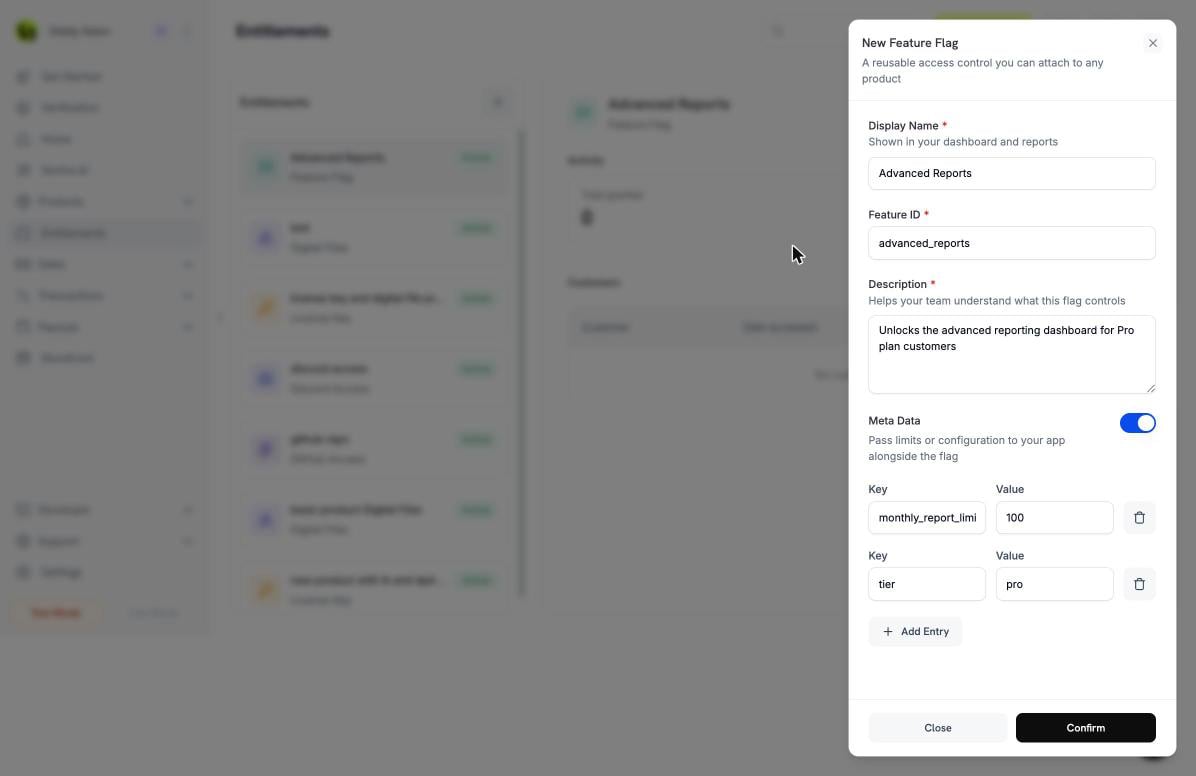 * On purchase, the grant is created and moves straight to `delivered`. There is no `pending` phase and no customer action.
* The grant carries a typed `feature` payload — `{ "feature_type": "boolean", "feature_id": "advanced_reports" }` — and your application reads `feature_id` to decide what to unlock.
* Cancellation, refund, or manual revoke moves the grant to `revoked`, and the flag disappears automatically.
You can read a customer's grants with the new **`GET /customers/{customer_id}/entitlement-grants`** endpoint (status and integration-type filters, paginated), or keep them in sync via webhooks. Entitlement metadata now also supports a `string | number | boolean` scalar union, so you can attach limits and quotas alongside the flag.
Learn more: [Feature Flag Entitlement](/features/entitlements/feature-flags) | [Entitlements](/features/entitlements/introduction)
### 4. **Apple Pay Domain Registration**
You can now register and verify **your own domains** for Apple Pay directly from the dashboard, enabling one-tap Apple Pay on inline (embedded) checkout hosted on your site.
Set it up from **Settings → Payment Methods**: on the **Apple Pay** row, click **Manage domains**, download the domain-association file, host it on your domain, then register and verify. Domain verification is only required for inline (embedded) checkout — overlay checkout, hosted checkout, and payment links work without it.
* On purchase, the grant is created and moves straight to `delivered`. There is no `pending` phase and no customer action.
* The grant carries a typed `feature` payload — `{ "feature_type": "boolean", "feature_id": "advanced_reports" }` — and your application reads `feature_id` to decide what to unlock.
* Cancellation, refund, or manual revoke moves the grant to `revoked`, and the flag disappears automatically.
You can read a customer's grants with the new **`GET /customers/{customer_id}/entitlement-grants`** endpoint (status and integration-type filters, paginated), or keep them in sync via webhooks. Entitlement metadata now also supports a `string | number | boolean` scalar union, so you can attach limits and quotas alongside the flag.
Learn more: [Feature Flag Entitlement](/features/entitlements/feature-flags) | [Entitlements](/features/entitlements/introduction)
### 4. **Apple Pay Domain Registration**
You can now register and verify **your own domains** for Apple Pay directly from the dashboard, enabling one-tap Apple Pay on inline (embedded) checkout hosted on your site.
Set it up from **Settings → Payment Methods**: on the **Apple Pay** row, click **Manage domains**, download the domain-association file, host it on your domain, then register and verify. Domain verification is only required for inline (embedded) checkout — overlay checkout, hosted checkout, and payment links work without it.
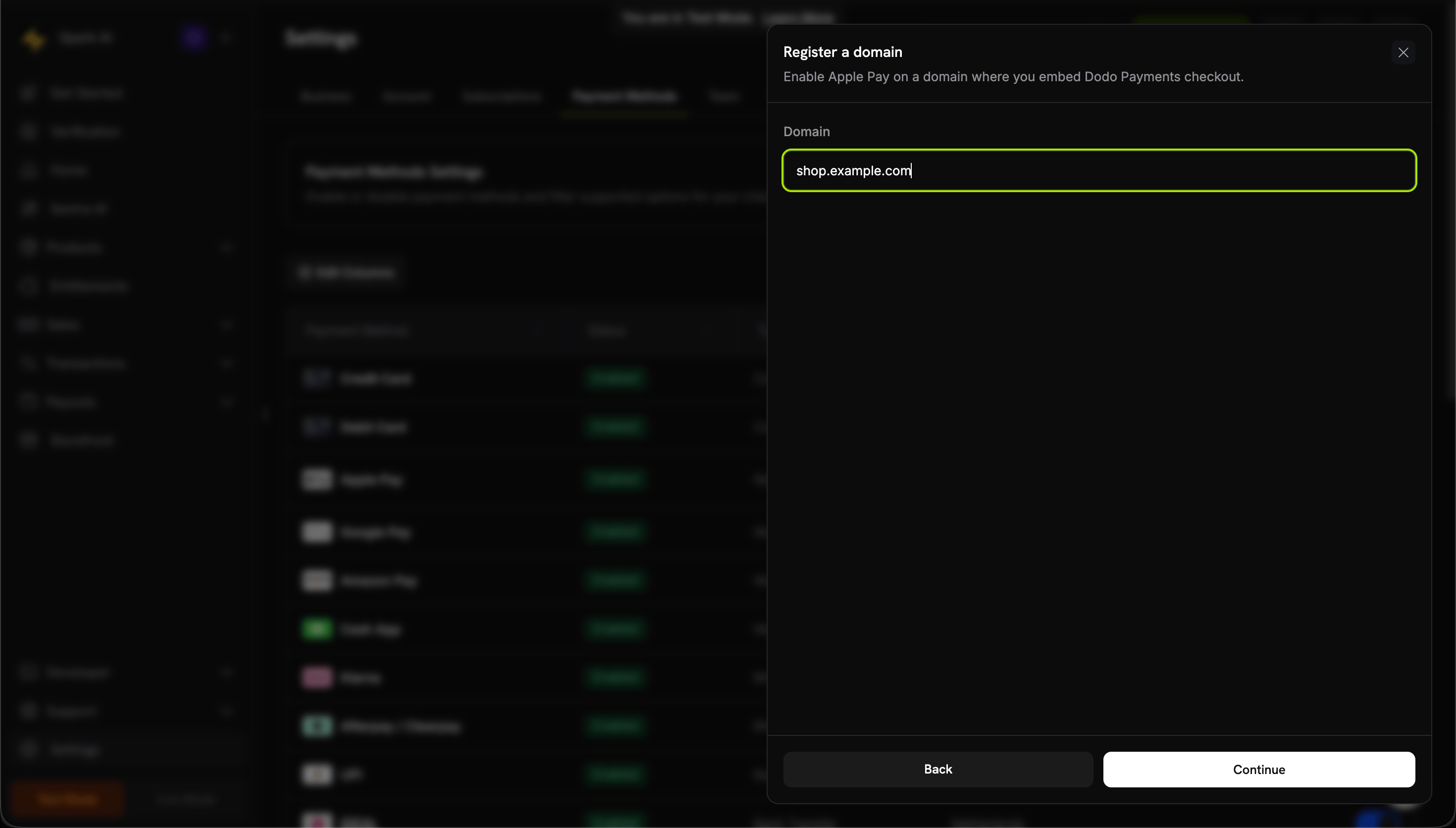 Disabling a domain is a kill switch that stops Dodo from offering Apple Pay on that domain at checkout — it does not unregister the domain with Apple.
Learn more: [Digital Wallets](/features/payment-methods/digital-wallets)
### 5. **Editable Add-ons at Checkout**
A new `allow_editing_addons` feature flag on checkout sessions lets customers **add or remove add-ons on a subscription product during checkout**, instead of locking the cart to a fixed set of add-ons.
```typescript theme={null}
const session = await client.checkoutSessions.create({
product_cart: [{ product_id: 'prod_abc', quantity: 1 }],
feature_flags: {
allow_editing_addons: true // customers can edit add-ons at checkout
},
return_url: 'https://yoursite.com/return'
});
```
The flag defaults to `false` and only applies to subscription products. It is also surfaced on `GET /checkout/sessions/{id}` so your front end knows whether add-on editing is enabled for a session.
Learn more: [Checkout Session](/developer-resources/checkout-session) | [Add-ons](/features/addons)
## Improvements & Bug Fixes
### 6. **Extend a Subscription's Period via `PATCH /subscriptions`**
`PATCH /subscriptions/{id}` now accepts `subscription_period_count` and `subscription_period_interval`, so you can **extend** a subscription's current period — for example, to grant extra time. The subscription's expiry (`expires_at`) is recomputed from the new count and interval and persisted.
A subscription's period can only be **increased**, never shortened.
Learn more: [Update Subscription](/api-reference/subscriptions/patch-subscriptions)
### 7. **Remove Images From Add-ons**
`PATCH /addons/{id}` now supports clearing an add-on's image by sending `image_id: null`. An explicit `null` removes the image, while omitting the field leaves it unchanged — matching the same convention used by products and product collections.
Learn more: [Update Add-on](/api-reference/addons/update-addon)
### Other Fixes & Improvements
* Minor bug fixes and stability improvements across the platform.
Disabling a domain is a kill switch that stops Dodo from offering Apple Pay on that domain at checkout — it does not unregister the domain with Apple.
Learn more: [Digital Wallets](/features/payment-methods/digital-wallets)
### 5. **Editable Add-ons at Checkout**
A new `allow_editing_addons` feature flag on checkout sessions lets customers **add or remove add-ons on a subscription product during checkout**, instead of locking the cart to a fixed set of add-ons.
```typescript theme={null}
const session = await client.checkoutSessions.create({
product_cart: [{ product_id: 'prod_abc', quantity: 1 }],
feature_flags: {
allow_editing_addons: true // customers can edit add-ons at checkout
},
return_url: 'https://yoursite.com/return'
});
```
The flag defaults to `false` and only applies to subscription products. It is also surfaced on `GET /checkout/sessions/{id}` so your front end knows whether add-on editing is enabled for a session.
Learn more: [Checkout Session](/developer-resources/checkout-session) | [Add-ons](/features/addons)
## Improvements & Bug Fixes
### 6. **Extend a Subscription's Period via `PATCH /subscriptions`**
`PATCH /subscriptions/{id}` now accepts `subscription_period_count` and `subscription_period_interval`, so you can **extend** a subscription's current period — for example, to grant extra time. The subscription's expiry (`expires_at`) is recomputed from the new count and interval and persisted.
A subscription's period can only be **increased**, never shortened.
Learn more: [Update Subscription](/api-reference/subscriptions/patch-subscriptions)
### 7. **Remove Images From Add-ons**
`PATCH /addons/{id}` now supports clearing an add-on's image by sending `image_id: null`. An explicit `null` removes the image, while omitting the field leaves it unchanged — matching the same convention used by products and product collections.
Learn more: [Update Add-on](/api-reference/addons/update-addon)
### Other Fixes & Improvements
* Minor bug fixes and stability improvements across the platform.