> ## Documentation Index
> Fetch the complete documentation index at: https://docs.dodopayments.com/llms.txt
> Use this file to discover all available pages before exploring further.
# License Keys
> Generate and deliver unique license keys with activation limits and expiry. License keys are the License Key entitlement type. They're issued automatically on payment, tied to subscription lifecycle, and revoked on cancellation or refund.
License keys are the License Key entitlement type. Create a License Key entitlement once with the activation limit, expiry, and instructions you want, attach it to any product, and Dodo Payments generates and delivers a key per purchase or subscription seat, automatically.
## What are License Keys?
License keys are unique tokens that authorize access to your product. They're ideal for:
* **Software licensing**: Desktop apps, plugins, and CLIs
* **Per-seat controls**: Limit activations per user or device
* **Digital goods**: Gate downloads, updates, or premium features
Inside Dodo Payments, license keys are managed through the [Entitlements](/features/entitlements/introduction) system, meaning the lifecycle of every key (creation, expiry, revocation, regrant) is driven by the same payment and subscription events as your other deliverables.
## Create a License Key Entitlement
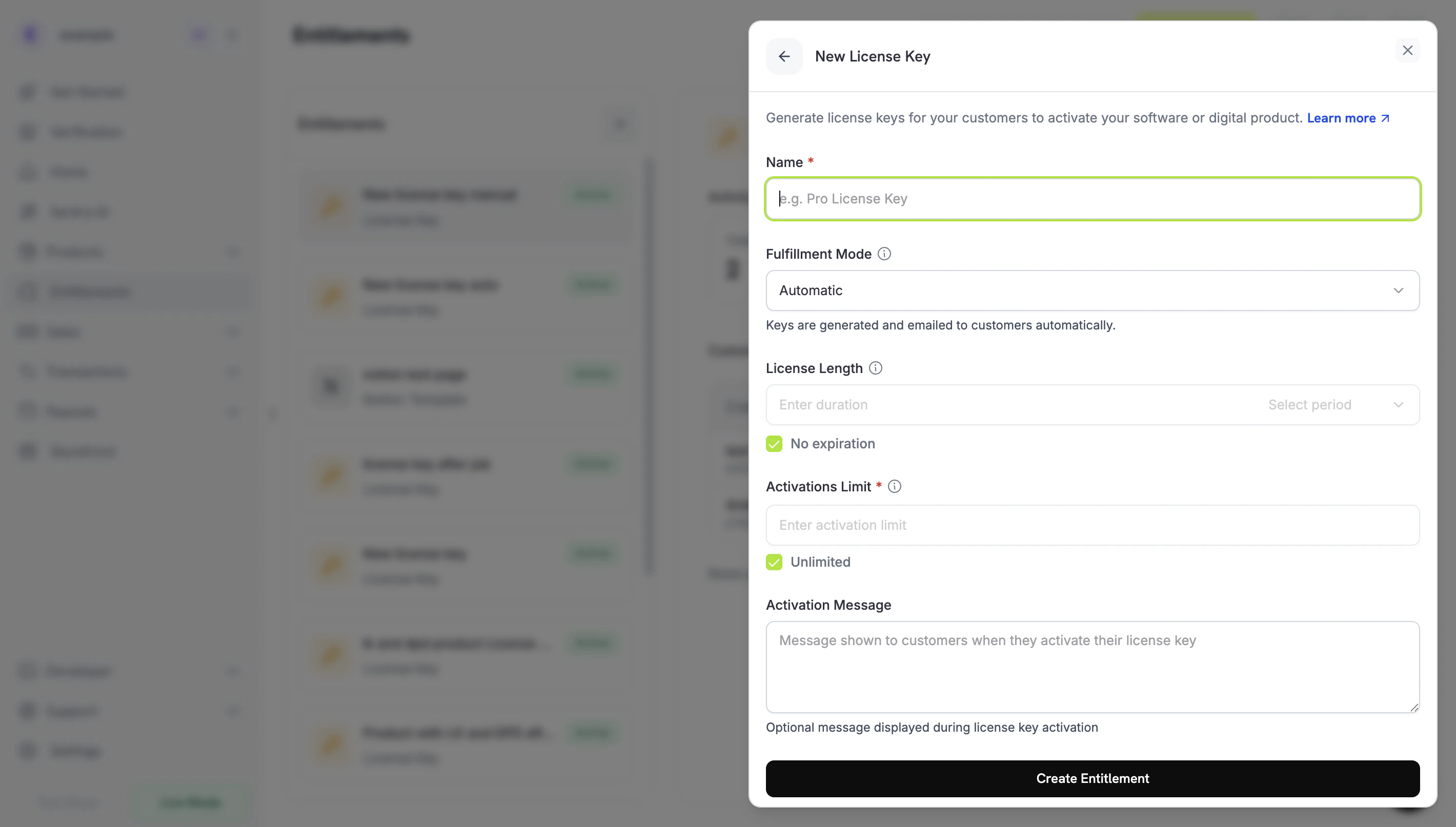
Go to **Entitlements** in your Dodo Payments dashboard and click **+** to create a new entitlement.
Select **License Key** as the integration. Configure how each issued key behaves:
* **Activations Limit**: Maximum concurrent activations per key (e.g., `1` for single-user, `5` for team licenses, leave blank for unlimited).
* **Duration**: How long the key stays valid after issuance (e.g., 30 days, 1 year). For subscription-issued keys, leave blank; keys remain valid as long as the subscription is active.
* **Activation Instructions**: Customer-facing instructions emailed with the key. Examples: `Paste the key in Settings → License` or `Run: mycli activate `.
Save. The entitlement is now available to attach to any product.
## Attach to Products
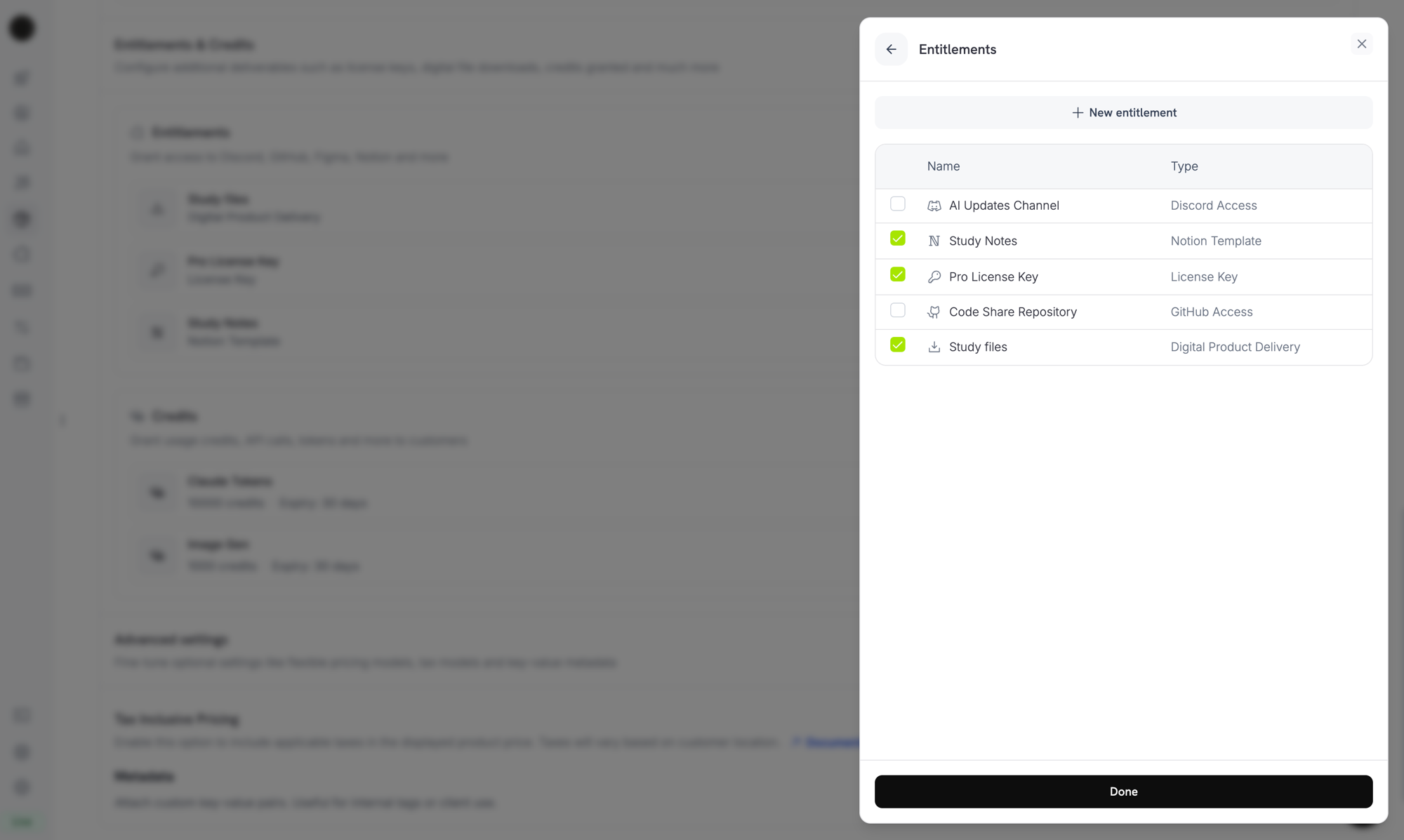
Open a product, expand **Advanced Settings → Entitlements & Credits**, and select your License Key entitlement. A single product can deliver a license key alongside other entitlements (Discord access, file downloads, GitHub repo access, etc.) on the same purchase.
***
## How Keys Are Issued
Key issuance follows the standard [grant lifecycle](/features/entitlements/introduction#how-grants-work):
| Event | Behavior |
| ------------------------------------ | -------------------------------------------------------------------------------------------------------------------------- |
| `payment.succeeded` (one-time) | Generate one key per `quantity` purchased. Key expiry honors the entitlement's duration. |
| `subscription.active` | Generate one key per subscription `quantity` (seat). Key has no expiry; validity is tied to subscription status. |
| `subscription.renewed` | No-op. Existing keys persist. |
| `subscription.on_hold` | Disable the keys. They reactivate when the subscription comes off hold. |
| `subscription.cancelled` / `expired` | Disable the keys permanently. |
| `subscription.plan_changed` | Disable the old keys; issue new ones for the new plan. |
| `refund.succeeded` (one-time) | Disable the keys. |
| Manual revoke via API/dashboard | Disable the keys with `revocation_reason: manual`. These are not auto-regranted on subscription renewal. |
| License key disabled directly | Revoke the grant with `revocation_reason: license_key_disabled`. Re-enabling the key re-activates the grant automatically. |
### Quantity behavior
* **Subscription products** issue one key per seat (`subscriptions.quantity`).
* **One-time products** issue one key per cart line item (`product_cart.quantity`).
* **Manual API grants** issue exactly one key.
## Activation, Validation, Deactivation
The activation/validation/deactivation API endpoints are **public** and require no API key. Use them directly from desktop software, CLIs, or browser-based clients to verify keys at runtime.
**Public Endpoints**: The activate, deactivate, and validate license endpoints are public and do not require an API key. Call them directly from your client applications without exposing your API credentials.
### Activate a license
```typescript TypeScript theme={null} theme={null}
import DodoPayments from 'dodopayments';
// No API key needed for public license endpoints
const client = new DodoPayments();
const response = await client.licenses.activate({
license_key: 'PRO-AAAA-BBBB-CCCC-DDDD',
name: 'Device Name',
});
console.log(response.id);
```
```python Python theme={null} theme={null}
client.licenses.activate(
license_key="PRO-AAAA-BBBB-CCCC-DDDD",
name="Device Name",
)
```
```bash cURL theme={null} theme={null}
curl -X POST https://test.dodopayments.com/licenses/activate \
-H "Content-Type: application/json" \
-d '{
"license_key": "PRO-AAAA-BBBB-CCCC-DDDD",
"name": "Device Name"
}'
```
### Validate a license
```typescript TypeScript theme={null} theme={null}
const response = await client.licenses.validate({
license_key: 'PRO-AAAA-BBBB-CCCC-DDDD',
});
console.log(response.valid);
```
```bash cURL theme={null} theme={null}
curl -X POST https://test.dodopayments.com/licenses/validate \
-H "Content-Type: application/json" \
-d '{ "license_key": "PRO-AAAA-BBBB-CCCC-DDDD" }'
```
### Deactivate an activation instance
```typescript theme={null} theme={null}
await client.licenses.deactivate({
license_key: 'PRO-AAAA-BBBB-CCCC-DDDD',
license_key_instance_id: 'instance_abc123',
});
```
***
## Manage Keys
عند شراء العميل لمنتج بوضعية يدوية، يتم إنشاء المنحة بحالة `pending` بدون مفتاح ويتم تشغيل [`entitlement_grant.created`](/developer-resources/webhooks/intents/entitlement-grant) webhook مع `integration_type: "license_key"` و `status: "pending"`. يمكنك الاستجابة لهذا الـ webhook، أو الاستعلام عن نقطة النهاية [List Customer Grants](/api-reference/entitlements/list-customer-grants) باستخدام الفلترين: `integration_type` و `status`:
```typescript theme={null} theme={null}
const pending = await client.customers.listEntitlementGrants('customer_id', {
integration_type: 'license_key',
status: 'Pending',
});
```
```typescript theme={null} theme={null}
const grants = await client.entitlements.grants.list('ent_license_key_id', {
status: 'delivered',
});
for (const grant of grants.items) {
console.log(grant.license_key.key, grant.license_key.activations_used);
}
```
## Import Existing License Keys via API
Already have license keys in another system? Use the [Create License Key](/api-reference/licenses/create-license-key) API to import them into Dodo Payments. This lets you migrate existing keys without disrupting your customers — they continue to activate, validate, and deactivate against the same key strings without re-issuance.
License keys created or updated through the API do not trigger email notifications to customers. If you need to notify customers about an imported key, handle that separately in your application.
```typescript theme={null} theme={null}
const licenseKey = await client.licenseKeys.create({
customer_id: 'cus_abc123',
product_id: 'prod_456',
key: 'YOUR-EXISTING-LICENSE-KEY',
activations_limit: 5,
expires_at: '2026-12-31T23:59:59Z',
});
```
### How imported keys differ from auto-generated keys
| Field | Auto-generated key | Imported key |
| --------------------------- | -------------------------------------------- | ------------------------------------- |
| `source` | `"auto"` | `"import"` |
| `payment_id` | Set to the originating payment | `null` (no Dodo Payments transaction) |
| `subscription_id` | Set if the key was issued via a subscription | `null` unless explicitly linked |
| Customer email notification | Sent on issuance | Not sent — handle separately |
Use the `source` field on `GET /license_keys` responses to distinguish migrated inventory from organically issued keys when reconciling or auditing.
Migrating from **Polar.sh** or **Lemon Squeezy**? The [`dodo-migrate` CLI](/migrate-to-dodo) automates bulk imports of products, customers, discounts, and license keys in a single command and maps external IDs to Dodo IDs automatically.
***
## License Keys in Return URL
When a customer completes a purchase for a product with a License Key entitlement, the generated key is automatically appended to your `return_url` as a query parameter. This lets you display the key immediately on your success page without making an extra API call.
```text theme={null} theme={null}
https://yoursite.com/return?payment_id=pay_xxx&status=succeeded&license_key=LK-001&email=customer%40example.com
```
If the purchase generates multiple keys (quantity > 1), they are comma-separated:
```text theme={null} theme={null}
https://yoursite.com/return?payment_id=pay_xxx&status=succeeded&license_key=LK-001,LK-002&email=customer%40example.com
```
For subscriptions, `subscription_id` is used instead of `payment_id`:
```text theme={null} theme={null}
https://yoursite.com/return?subscription_id=sub_xxx&status=active&license_key=LK-001&email=customer%40example.com
```
Parse the `license_key` parameter on your return page to show the key immediately, improving the post-purchase experience.
***
## API Management
Activation, deactivation, and validation are public; no API key required.
Create or record an activation instance for a license key.
Revoke a prior activation to free up capacity.
Check authenticity, status, and constraints before granting access.
Create, list, retrieve, and update individual license key records. Use these to import existing keys or fetch usage details.
Create a new license key or import an existing one.
```typescript theme={null} theme={null}
const grants = await client.entitlements.grants.list('ent_license_key_id', {
status: 'Delivered',
});
for (const grant of grants.items) {
console.log(grant.license_key.key, grant.license_key.activations_used);
}
```
Retrieve a specific key and its metadata.
Modify expiry, activation limits, or enable/disable a key.
Manage the License Key entitlement itself: its activation limit, duration, and instructions.
Create a License Key entitlement.
Update the entitlement's configuration.
List the keys issued for an entitlement.
Manually revoke a customer's key.
***
## Webhooks
License-key delivery and revocation fire the four [`entitlement_grant.*` webhook events](/developer-resources/webhooks/intents/entitlement-grant). The grant payload includes a populated `license_key` object with the key, expiry, activations used, and limit.
The legacy `license_key.*` events (`license_key.created`) continue to fire for the underlying license-key record lifecycle; see the [License Key webhook payload page](/developer-resources/webhooks/intents/license-key).
For new integrations, listen to `entitlement_grant.delivered` rather than `license_key.created`. The entitlement event tells you delivery is complete across all integrations on the product, not just the license key.
***
## Legacy License Keys
Products created with the older `license_key_enabled` flag have been **automatically migrated** to a License Key entitlement. The migration is transparent: existing customers' keys continue to work unchanged, the public `/licenses/activate`, `/licenses/validate`, `/licenses/deactivate` endpoints continue to function, and the `/license_keys/*` API endpoints continue to read and write to the same key store.
The standalone **License Keys** dashboard section remains available as a flat list of every key issued, useful for audit and search. New configuration (changing activation limits, durations, or instructions) should be done by editing the migrated License Key entitlement under **Entitlements**.
***
## Best Practices
* **Keep activation limits clear**: Choose sensible defaults (1 for single-user apps, 3–5 for team licenses) and document them.
* **Provide precise activation instructions**: Customers paste these from their email, so exact paths and commands save support tickets.
* **Validate keys server-side**: For network-connected products, validate via `/licenses/validate` rather than caching activation locally.
* **Use webhooks for revocation**: Listen to `entitlement_grant.revoked` to disable in-app features immediately when a customer cancels or refunds.
* **Test with subscriptions and one-times**: License key behavior differs subtly between the two, so test both before going live.
قم بتحليل معلمة `license_key` على صفحة العودة لعرض المفتاح مباشرة، مما يحسن تجربة ما بعد الشراء.
***
## إدارة API
التفعيل، الإلغاء، والتحقق علني؛ لا يتطلب مفتاح API.
أنشئ أو سجل مثيل تنشيط لمفتاح الترخيص.
قم بإلغاء التنشيط السابق لتحرير السعة.
تحقق من الأصالة، الحالة، والقيود قبل منح الوصول.
أنشئ، اعرض، استرجع، وقم بتحديث سجلات مفاتيح الترخيص الفردية. استخدمها لاستيراد المفاتيح الحالية أو لجلب تفاصيل الاستخدام.
أنشئ مفتاح ترخيص جديد أو قم باستيراد مفتاح موجود.
تصفح جميع المفاتيح بحالة الاستخدام وتفاصيلها.
استرجع مفتاحًا محددًا وبيانات التعريف الخاصة به.
قم بتعديل انتهاء الصلاحية، حدود التفعيل، أو تفعيل/تعطيل مفتاح.
قم بإدارة استحقاق مفتاح الترخيص نفسه: حده على التفعيل، مدته، وتعليماته.
أنشئ استحقاق مفتاح ترخيص.
قم بتحديث تكوين الاعتماد.
اعرض المفاتيح الصادرة لاستحقاق.
قم بإلغاء مفتاح العميل يدويًا.
***
## Webhooks
تفعيل وإلغاء تفعيل مفتاح الترخيص يُشعل الأحداث الأربع [`entitlement_grant.*` webhook](/developer-resources/webhooks/intents/entitlement-grant). تشمل حمولة المنحة كائنًا معبأً `license_key` بالمفتاح، والانتهاء، والتفعيلات المستخدمة، والحد.
تستمر أحداث `license_key.*` القديمة (`license_key.created`) في العمل لدورة حياة سجل مفتاح الترخيص الأساسي؛ يتم الاطلاع على [صفحة حمولة مفتاح الترخيص webhook](/developer-resources/webhooks/intents/license-key).
بالنسبة للتكاملات الجديدة، استمع إلى `entitlement_grant.delivered` بدلاً من `license_key.created`. يخبرك حدث التمكين بأن التسليم اكتمل عبر جميع التكاملات على المنتج، وليس فقط مفتاح الترخيص.
***
## مفاتيح الترخيص القديمة
تم **ترحيل** المنتجات التي تم إنشاؤها بالعلم القديم `license_key_enabled` تلقائيًا إلى استحقاق مفتاح ترخيص. الترحيل شفاف: تواصل مفاتيح العملاء الحالية العمل بدون تغيير، وتستمر واجهات `/licenses/activate` العامة، `/licenses/validate`، و `/licenses/deactivate` في العمل، وتستمر نُقَطَةْ النهاية API الخاصة بـ `/license_keys/*` في القراءة والكتابة في نفس مجموعة المفاتيح.
يظل قسم لوحة التحكم المستقلة **مفاتيح الترخيص** متاحًا كقائمة مستوية لكل مفتاح صادر، وهو مفيد للمراجعة والبحث. يجب أن يتم التكوين الجديد (تغيير حدود التنشيط أو المدد أو التعليمات) عن طريق تعديل استحقاق مفتاح الترخيص المرحل تحت **استحقاقات**.
***
## أفضل الممارسات
* **اجعل حدود التنشيط واضحة**: اختر افتراضات منطقية (1 لتطبيقات المستخدم الفردي، 3-5 لرخص الفريق) ووثقها.
* **قدم تعليمات تنشيط دقيقة**: يقوم العملاء بلصق هذه التعليمات من بريدهم الإلكتروني، لذا يوفر المسارات والأوامر الدقيقة تذاكر الدعم.
* **تحقق من المفاتيح على الخادم**: بالنسبة للمنتجات المتصلة بالشبكة، تحقق عبر `/licenses/validate` بدلاً من تخزين التنشيط محليًا.
* **استخدم الـ webhooks للإلغاء**: استمع إلى `entitlement_grant.revoked` لتعطيل ميزات التطبيق فورًا عند إلغاء العميل أو رد المبلغ.
* **اختبر مع الاشتراكات والدفعات الواحدة**: يختلف سلوك مفتاح الترخيص بدقة بين الاثنين، لذا قم باختبار كليهما قبل الدخول في التشغيل الفعلي.
 ***
## How Keys Are Issued
Key issuance follows the standard [grant lifecycle](/features/entitlements/introduction#how-grants-work):
| Event | Behavior |
| ------------------------------------ | -------------------------------------------------------------------------------------------------------------------------- |
| `payment.succeeded` (one-time) | Generate one key per `quantity` purchased. Key expiry honors the entitlement's duration. |
| `subscription.active` | Generate one key per subscription `quantity` (seat). Key has no expiry; validity is tied to subscription status. |
| `subscription.renewed` | No-op. Existing keys persist. |
| `subscription.on_hold` | Disable the keys. They reactivate when the subscription comes off hold. |
| `subscription.cancelled` / `expired` | Disable the keys permanently. |
| `subscription.plan_changed` | Disable the old keys; issue new ones for the new plan. |
| `refund.succeeded` (one-time) | Disable the keys. |
| Manual revoke via API/dashboard | Disable the keys with `revocation_reason: manual`. These are not auto-regranted on subscription renewal. |
| License key disabled directly | Revoke the grant with `revocation_reason: license_key_disabled`. Re-enabling the key re-activates the grant automatically. |
### Quantity behavior
* **Subscription products** issue one key per seat (`subscriptions.quantity`).
* **One-time products** issue one key per cart line item (`product_cart.quantity`).
* **Manual API grants** issue exactly one key.
## Activation, Validation, Deactivation
The activation/validation/deactivation API endpoints are **public** and require no API key. Use them directly from desktop software, CLIs, or browser-based clients to verify keys at runtime.
***
## How Keys Are Issued
Key issuance follows the standard [grant lifecycle](/features/entitlements/introduction#how-grants-work):
| Event | Behavior |
| ------------------------------------ | -------------------------------------------------------------------------------------------------------------------------- |
| `payment.succeeded` (one-time) | Generate one key per `quantity` purchased. Key expiry honors the entitlement's duration. |
| `subscription.active` | Generate one key per subscription `quantity` (seat). Key has no expiry; validity is tied to subscription status. |
| `subscription.renewed` | No-op. Existing keys persist. |
| `subscription.on_hold` | Disable the keys. They reactivate when the subscription comes off hold. |
| `subscription.cancelled` / `expired` | Disable the keys permanently. |
| `subscription.plan_changed` | Disable the old keys; issue new ones for the new plan. |
| `refund.succeeded` (one-time) | Disable the keys. |
| Manual revoke via API/dashboard | Disable the keys with `revocation_reason: manual`. These are not auto-regranted on subscription renewal. |
| License key disabled directly | Revoke the grant with `revocation_reason: license_key_disabled`. Re-enabling the key re-activates the grant automatically. |
### Quantity behavior
* **Subscription products** issue one key per seat (`subscriptions.quantity`).
* **One-time products** issue one key per cart line item (`product_cart.quantity`).
* **Manual API grants** issue exactly one key.
## Activation, Validation, Deactivation
The activation/validation/deactivation API endpoints are **public** and require no API key. Use them directly from desktop software, CLIs, or browser-based clients to verify keys at runtime.